
AI in Legal Practice

Amy Swaner
Calculating...
A Practical Guide for Lawyers, Judges, and AI Consultants
The question I get asked more than any other by attorneys—at every conference, in every CLE, over a casual lunch and even in the restroom—is this: “Is it safe to put privileged or confidential information into AI tools?” Not surprisingly the answer is that it depends—on which tool, how it’s configured, what your engagement agreement says, and the vendor’s terms of service and privacy policy.
AI adoption in legal practice is accelerating because it delivers real productivity gains—drafting, research, document review, and analysis that used to take hours can now take minutes. The duty of competence under Model Rule 1.1 increasingly requires familiarity with and use of AI tools. But the duty of confidentiality under Rule 1.6 requires that you understand where your client’s data goes before you transport it into cyberspace.
Here is my considered, researched position:
Putting confidential client information into properly configured AI tools is no less safe than using the cloud-based practice management, document management, and email systems lawyers already rely on every day.
Yes, you can put confidential information into AI tools—provided you select the right tier, enable the right privacy controls, and apply the same vendor scrutiny you already use for other cloud platforms. If lawyers understood AI tools, their data usage, and cloud platforms, they would likely calm down about using AI tools and putting confidential information into those AI tools. And that’s my goal for this article.
First, the Risks
We can all agree attorney-client privilege is and always will be sacrosanct. It is our highest duty to our clients; central to our effective representation of the client. And it’s the client’s privilege to waive, not ours so we treat it with extra care. Before evaluating any specific tool, lawyers need to understand there are certain risks that won’t go away. But—and this is the point this article will keep returning to—risks exist in every piece of cloud-hosted software your firm already uses.
Risk 1 -- Architecture Problem
There is one bright-line rule regarding AI use that I can give without qualification: Never submit anything of consequence—client data, privileged communications, confidential business information—into a free-tier AI tool. Ever.
Free tiers are advertising products. They are monetized through data collection, model training, and usage analytics. If you are not paying for the product, your data is the product, even if you are choosing not to “help improve the model for everyone.” That’s not to say that the information you enter even into a free tier AI tool will be easily retrievable, for the reasons set out below. But using free tools doesn’t show the reasonable care required by our professional duties. Every substantive discussion about AI and confidentiality starts above the free tier.
Risk 2 – Subpoenas and Government Access
Any data stored on vendor servers is potentially reachable by subpoena. This is true of every AI tool on the market, including legal-specific platforms like Harvey. But notably it is also true of data stored in the cloud, on your DMS, email, and PMS platforms.
Third-party subpoenas to AI vendors are uncommon today, but the legal infrastructure to compel production exists. Metadata and prompt logs could become discoverable artifacts in litigation. The Stored Communications Act (18 U.S.C. §§ 2701–2713 as part of the Electronic Communications Privacy Act of 1986) provides some protection, but it was not written with AI prompt logs in mind, and its application here is unsettled.
Courts have addressed these issues in the context of legal hold obligations, and the same frameworks will likely apply to AI vendors.
Risk 3 -- Third-Party Access
Human employees at AI companies—trust and safety teams, model trainers, quality evaluators—may review your prompts. They have no professional obligation of confidentiality, no bar license, and no malpractice exposure. But again, the same is true of the support engineers, system administrators, and compliance teams at your DMS provider, your email host, and your practice management vendor. Do you really think Microsoft can’t access every single one of your documents stored in the MS cloud environment if it wanted to? The relevant inquiry is whether AI vendor access is contractually bounded and limited to defined purposes—the same inquiry you should be making about every cloud platform in your stack.
Risk 4 – User Error
This is perhaps the most pernicious risk, but is more easily contained. The humans using AI are the biggest threat to confidentiality. Shadow use of unapproved tools, no data governance plan, no AI policy, and no training all can lead to leakage of your confidential data. Rather than belabor those risks, I refer you to the linked articles.
There are risks, as with any cloud platform, but they can be managed.
LLMs Are More Privacy Friendly Than You Think
LLMs are more privacy friendly that you are currently imagining. There were several incidents when AI tools became popular, and they have resulted in “leak lore” that some still let impact their views of AI tools. But to accurately assess the risks of using AI tools for legal work, you need to understand more about how large language models actually work.
LLMs are Stateless
Retrieving information stored in an LLM is not like retrieving information from a database. LLMs are stateless which means that prompts, attachments and information you submit to an AI tool are not stored verbatim in some huge database somewhere that keeps growing every minute, every second. Each conversation begins from scratch. The model has no memory of prior sessions, no index of previous prompts, and no mechanism to retrieve what you or anyone else typed yesterday. When a session ends, your input exist only in the vendor’s server logs (subject to the retention policy and DPA) and wherever you saved it—not in the model’s active memory. An LLM is an inference engine; it generates responses based on patterns learned during training, not by looking up stored inputs. This is fundamentally different from a database, which stores and retrieves records.

Your Data Is Just Not That Important
Consider the worst case-- free tier, training enabled. You are sharing all of your data with the LLM for training and use. Even then the risk of a model reproducing your specific prompt is vanishingly small. AI tools do not “store” individual inputs. Each tool adjusts statistical weights across billions of parameters using aggregated data. The process is closer to adjusting the balance on an equalizer than to saving a file. A single prompt has negligible influence on a model trained on trillions of tokens or words. Modern training techniques—such as deduplication and differential privacy—are specifically designed to prevent verbatim memorization of training data. The AI memorization is an edge case, not a systemic exposure.
Think of it this way. Consider one tiny drop of oil in an ocean. Once that drop hits the ocean, it starts to disperse. It’s impossible to recapture that one drop of oil, and only the oil. Now imagine a bucket of oil dumped into the ocean. Yes, you’ll see it more readily and can monitor and recapture at least part of it but there will be dispersal and dissemination. Finally, imagine the Exxon Valdez—a large oil tanker—spilling millions of gallons of oil in the ocean near Alaska. You couldn’t help but see and be affected by the oil if you were in the area, because there was a higher oil-to-water ratio. Fish died of asphyxiation and wildlife had to be cleaned off by hand using detergent.
Now imagine that your client’s most confidential information is entered into an AI tool. It’s like that drop of oil. Sure, it’s in the ocean, but it has dispersed. You aren’t going to get it back very easily, and not intact. With a bucket of data, there’s a slightly higher chance you’ll see something that resembles your data, but is still statistically unlikely. Once the data you feed in amounts to millions of gallons, you can’t help but encounter some of the data being spewed back out at you. My point is this – unless you and a bunch of others put a whole lot of data, about something so novel, so interesting, so shocking, or so important, you (and your opposing counsel) are not going to be able to get it back out of the AI tool intact. And that’s what I mean by “your data is likely just not that important.”
None of this means lawyers should be cavalier. The vendor’s server logs still exist, and are still reachable by subpoena, and retention periods still matter. But the technical architecture of LLMs provides a layer of structural protection that has no analogue in traditional document storage. Your DMS stores your documents and can return them verbatim to anyone with access. An LLM—even one that trained on your data—almost certainly cannot.
The Cloud Comparison Lawyers Are Ignoring
Consider what lawyers are already doing without a second thought. Clio, NetDocuments, iManage, Microsoft 365, Google Workspace—all live in the cloud and process and store confidential client data on third-party servers. Lawyers signed up for these platforms, clicked through their terms of service, and moved on.
The ABA has acknowledged that storing privileged communications with a cloud service provider does not waive privilege where the lawyer took reasonable precautions. ABA Formal Opinion 477R (2017) confirmed that confidentiality obligations apply to electronic communications and that reasonable precautions include vetting service providers. The opinion lays out a multi-factor reasonable efforts standard—assessing the sensitivity of the information, likelihood of disclosure without additional safeguards, cost of safeguards, difficulty of implementation, and the client’s own instructions. AI tools are the next iteration of the same analysis. If encrypted cloud storage of intact, retrievable documents does not waive privilege, a properly configured AI tool with equivalent or stronger protections of dispersed data should not either.
ABA Formal Opinion 512 (2024) provides the current ethical framework. It requires that lawyers understand the terms of any AI tool before using it, obtain informed client consent before inputting confidential information into tools that may use data for training, and exercise supervisory obligations under Rules 5.1 and 5.3 when staff use AI tools. Boilerplate consent language in engagement letters will not satisfy the informed consent standard; I’ve included a paragraph you can use and modify for your needs.
Does Using AI Waive Privilege?
The developing case law on AI and attorney-client privilege is sparse but instructive. Two district court decisions issued on the same day give us guidance. I’ve only highlighted them here; I analyze and explain them in depth in a companion article.
US v Heppner and Warner v Gilbarco
Two cases from district courts—persuasive authority at best—can nonetheless give us insight into how courts might consider these issues. In United States v. Heppner a criminal defendant generated documents using Claude. The judge found they were not protected by attorney-client privilege or the work product doctrine, because he was not obtaining them at the direction of his legal counsel. Further, he had no reasonable expectation of confidentiality because the version he was using permitted data collection, model training, and disclosure to third parties.
On the same day, the court in Warner v. Gilbarco Inc. reached a compatible result on different facts. A pro se plaintiff used ChatGPT as part of her case preparation. The defendant moved to compel production of her AI interactions, arguing that using the AI tool waived any protection. The judge disagreed, because ChatGPT is a tool and work product can only be waived by disclosure to an adversary.
Sharing work product with an AI tool is not adversary disclosure—but you still need to show counsel’s involvement. Both decisions left open that counsel-directed AI use on a secure platform could yield a different result.
Type of Privilege Matters
One distinction worth understanding is that attorney-client privilege and the work product doctrine are separate protections with different waiver standards. Privilege protects confidential communications between attorney and client; it can be waived by voluntary disclosure to any third party.
Work product protects materials prepared in anticipation of litigation. Waiver of it requires disclosure to an adversary or someone likely to disclose to an adversary. Warner relied on exactly this reasoning—AI tools are “tools, not persons,” and sharing materials with a tool is not disclosure to an adversary—meaning work product protection survived the pro se plaintiff’s use of ChatGPT. The Warner plaintiff was acting as her own counsel, so her materials satisfied even the stricter standard that Heppner articulated; that of preparation at counsel’s behest. The bottom line is that work product is the stronger doctrinal argument for protecting AI-assisted legal work, and an attorney who directs the AI interaction is well-positioned under either court’s reasoning.
What to Do Monday Morning
Update your engagement letters and your AI policy. These are evidence of your reasonable precautions. And then answer these questions about your AI tools:
Does the vendor use my input data to train its models? Can I reliably, verifiably turn that off?
Can vendor employees access my prompts? For what purpose? Is AI tool access different than any other cloud platform?
What is the data retention period? can I minimize it, and/or request deletion? If not, am I comfortable with it?
Does the vendor offer a DPA at my subscription tier?
Are my AI interactions attorney-directed work product?
These are exactly the questions you should already be asking about your DMS, your PMS, and your email provider. If you vetted Clio, NetDocuments, or iManage before onboarding—and you should have—then you already know how to do this. Apply the same standard. The only thing that has changed is the category of tool.
Conclusion
I’m still a lawyer. And I will never guarantee an AI tool to be unequivocally “safe.” “Safe” is a risk management decision—the same kind of decision lawyers make every time they transmit client information electronically—through whatever means. No cloud platform is perfectly secure, just like no physical location is perfectly secure. Law firms are hot targets for bad actors specifically because they maintain confidential and valuable information, and aren’t always hardened against cybersecurity attacks. And so, you need to make that decision of “safe” vs. “not safe” yourself, based on your firm’s preparedness. But make it based on actual verification and understanding, not fear and speculation.
What I hope you have taken away from this article is that with the appropriate precautions, AI tools are safe for confidential information. Privacy controls exist. Contractual protections exist. Use them. At the paid and enterprise tiers, the major AI platforms offer encryption, training opt-outs, SOC 2 Type II and ISO 27001 certification, and DPAs that are functionally equivalent to—and in some cases stronger than—what lawyers accepted years ago from their cloud DMS, PMS, and email providers. If you are comfortable sending whole, intact client documents through Microsoft 365 and storing case files in NetDocuments, then a properly configured AI tool presents an equivalent risk profile.
Best Practices for Lawyers Using AI Technology
1. Maintain technological competence. Stay current on the capabilities, limitations, and risks of AI tools you use. (Model Rule 1.1, Comment 8; ABA Formal Op. 512 §II.A; ABA Formal Op. 477R §II)
2. Independently verify all AI output. You are fully responsible for the work you sign. Never file, send, or rely on AI-generated work product—including legal citations, case analysis, and factual assertions—without reviewing it for accuracy. (Rule 11, Op. 512 §II.A)
3. Match security measures to sensitivity. Apply a risk-based, fact-specific approach: assess the sensitivity of the information, the likelihood of disclosure, the cost and difficulty of safeguards, and the impact on your ability to represent the client. (Op. 477R §III, Comment [18] factors)
4. Communicate with clients about AI use. Use your engagement letter to disclose your use of AI tools. (Op. 512 §II.C) You are welcome to lift the example included below.
5. Establish firm-wide AI policies and training. Create clear policies on permissible AI use and train all lawyers and staff on ethical obligations, data handling, and the specific tools in use. (Op. 512 §II.E; Op. 477R §III, item 6)
6. Conduct due diligence on AI vendors. Vet providers for security protocols, data-retention practices, confidentiality commitments, breach-notification procedures, and enforceability of contractual protections—just as you would any outsourced service. (Op. 512 §II.E; Op. 477R §III, item 7)
7. Comply with court-specific AI disclosure rules. Check local rules and standing orders for any requirement to disclose AI use in filings. Regardless, ensure all submissions satisfy Rules 3.1, 3.3, and 8.4(c)—no fabricated citations, no false statements, no misleading arguments. (Op. 512 §II.D)
8. Label privileged and confidential communications. As an extra precaution include “privileged and confidential” in your prompts to trigger duties under Model Rule 4.4(b). (Op. 477R §III, item 5) And if you are directing another to use an AI tool for you, document AI use as attorney-directed work product. (Rules 5.1, 5.3; Op. 512 §II.E)
Still have questions? Check out the follow-up to this article, 9 Myths About AI Privacy for Lawyers.
________________________________________________________________
The Vendor Comparison Of What You Actually Get
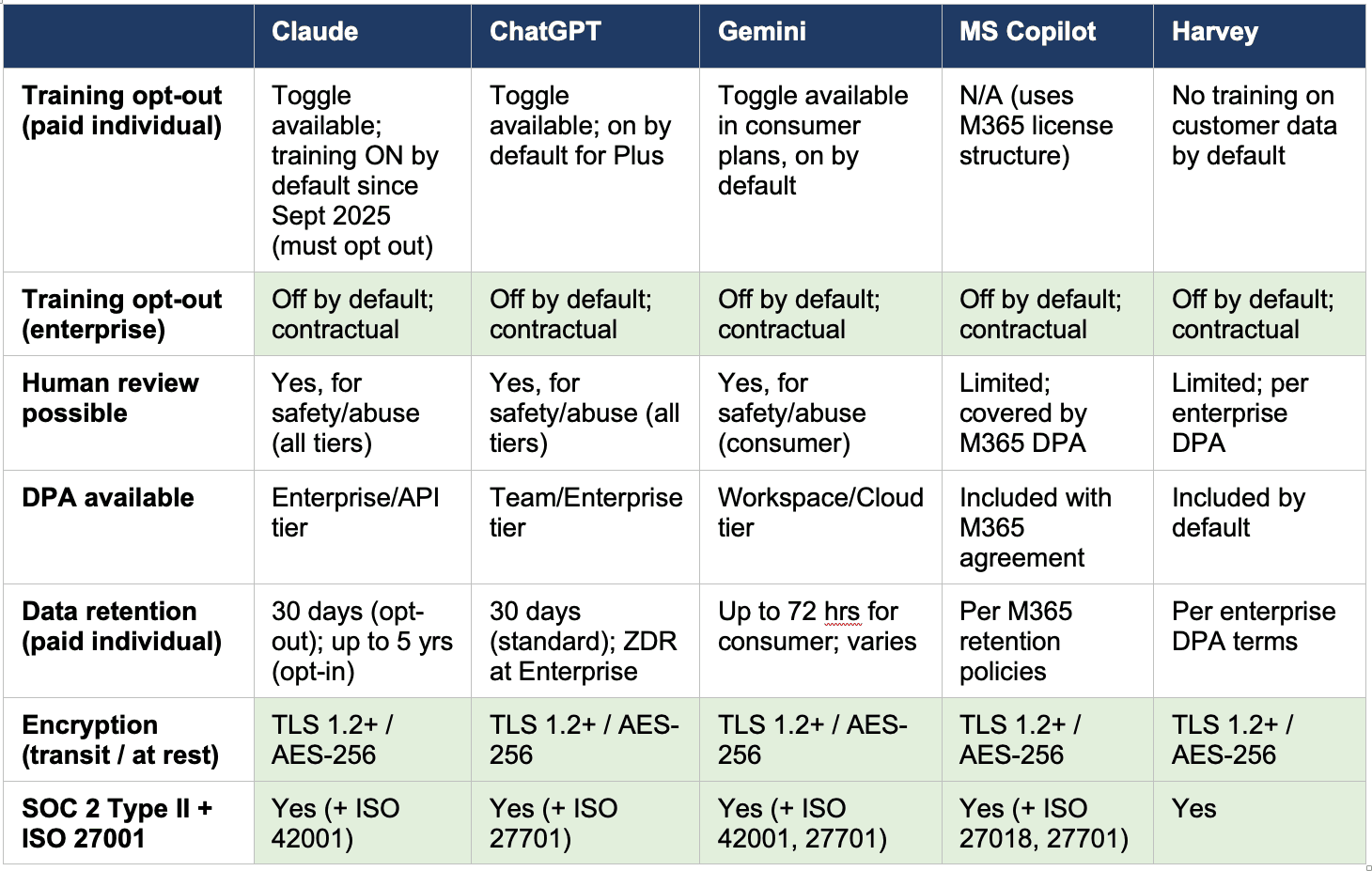
The following table compares five widely used AI tools—four general-purpose platforms and one legal-specific platform—across the privacy dimensions that should matter to lawyers. Source: OpenAI Enterprise Privacy, Anthropic Privacy Center, Google Workspace AI Privacy, Microsoft 365 Copilot Privacy, Harvey Security.
Note: double check this information, especially the data retention timeframes, as policies and features frequently change.
At the enterprise tier, all five vendors—general-purpose and legal-specific alike—offer contractual commitments against training on your data, DPA coverage, SOC 2 Type II and ISO 27001 certification, and industry-standard encryption. At the paid individual tier, protections exist but are thinner—privacy toggles rather than contractual commitments, and human review for safety purposes remains possible across the board. No tier fully eliminates all vendor access, which, again, is exactly the same as your DMS, your email provider, and your practice management platform. And every AI tool, regardless of vendor or tier, stores data on servers reachable by third-party subpoena.
Is Harvey Better?
Harvey deserves specific comment here. Some lawyers treat legal-specific AI tools as inherently safer than general-purpose tools like ChatGPT or Claude. I heard an AI ‘expert’ tell fellow lawyers that Harvey is safe to use for confidential information but the other general-purpose tools are not. That statement was based on, as far as I can tell, exactly nothing. The chart shows why that statement is false. Harvey’s security posture (SOC 2 Type II, ISO 27001, AES-256, no training by default) is strong, but it mirrors what Claude, ChatGPT, Gemini, and Copilot offer at enterprise tier—every one of which holds SOC 2 Type II and ISO 27001 certification. The protections flow from the vendor’s security architecture and contractual commitments, not from whether the tool was built for lawyers. A legal-specific label does not substitute for reading the DPA. And it bears remembering that every legal-specific AI tool is built on top of one or more frontier AI models (eg Claude, ChatGPT, or an open-source tool). Currently there is no AI tool purpose-built only for legal use.
________________________________________________________________
SIDEBAR: Model Engagement Letter Language for AI Tool Use
The following paragraph may be adapted for inclusion in engagement letters or supplemental client disclosures. Bracketed items should be customized to your firm and tools.
In the course of representing you, our firm may use artificial intelligence tools, including without limitation, [tool name(s)], to assist with [drafting, research, document review, analysis]. These tools are provided by third-party vendors and process information on cloud-based servers. We use [paid/enterprise]-tier subscriptions with the following privacy controls enabled: [training data opt-out is enabled; data is not used to improve the vendor’s models; a Data Processing Agreement governs the vendor’s handling of information]. While these tools employ industry-standard encryption and access controls, vendor employees may have limited access to submitted information for safety and abuse-detection purposes, consistent with how cloud-based document management and email systems operate. AI-assisted work product is prepared at the direction and under the supervision of the attorneys assigned to your matter. We do not submit [categories of excluded information, e.g., Social Security numbers, financial account numbers] to AI tools under any circumstances. By signing this engagement letter, you consent to our use of these tools under the conditions described above. If you have questions or wish to restrict or prohibit our use of AI tools in your matter, please let us know.
Note: This language is designed to satisfy the informed consent standard articulated in ABA Formal Opinion 512. It identifies the tool, describes the privacy posture, discloses the residual risk (vendor safety review), establishes attorney direction over AI work product, and gives the client the opportunity to opt out. Firms should update this language as vendor terms, case law, and ethical guidance evolve.
© 2026 Amy Swaner. All Rights Reserved. May use with attribution and link to article.
More Like This

What I Hate About Minnesota’s Nudification Statute
Minnesota’s new nudification law targets an urgent harm, but its “technical skill” exemption creates a troubling loophole: easy tools are banned, while the same nonconsensual image may escape liability if it took more work to create.

‘Reports of My Death Have Been Greatly Exaggerated’ — Prompt Engineering
Prompt engineering isn’t dead—it has grown up, replacing tricks and flattery with a more thoughtful approach that helps lawyers give AI better context, set clearer boundaries, and produce more reliable results.

Why Solo and Small Law Firms Lag in AI Adoption—And How to Change That
Solo and small-firm lawyers make up most of the U.S. bar, yet five structural barriers are slowing their AI adoption—and practical, focused tools may be the key to closing the gap.

